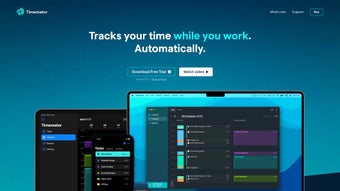

Download Timemator – Free Time Tracking & Productivity Tool for Mac
Overview
Timemator is a free personal finance‑oriented time‑management application built specifically for macOS. While its tagline highlights “personal finance,” the core strength of Timemator lies in helping freelancers, consultants, and knowledge workers track billable hours, monitor project progress, and uncover hidden productivity patterns. The app offers a clean, native‑Mac interface that blends seamlessly with the Apple ecosystem, allowing users to start, pause, and edit timers with just a few clicks or keyboard shortcuts.
What sets Timemator apart from generic time‑trackers is its deep integration with macOS features such as the Touch Bar, Notification Center, and iCloud sync, ensuring that time data is always up‑to‑date across devices. Because it is free, Timemator eliminates the financial barrier that many professional‑grade tools impose, making it an attractive entry point for anyone looking to boost efficiency without a subscription. Whether you’re a freelance designer billing per hour, a developer juggling multiple client projects, or a small business owner needing insight into staff utilization, Timemator provides a robust yet unobtrusive way to capture every minute of work, generate detailed reports, and visualize how time is allocated across tasks and projects.
Key Features That Make Timemator Stand Out
- Instant Timer Controls: Start, pause, and stop timers from the menu bar or with customizable keyboard shortcuts, ensuring no work goes unrecorded.
- Task & Project Categorization: Organize entries by client, project, or custom tags, enabling precise billing and easy filtering.
- Rich Reporting Engine: Generate daily, weekly, or monthly reports in CSV, PDF, or HTML formats, complete with graphs that illustrate time distribution.
- iCloud Sync: Securely sync all time entries across multiple Macs, so you can switch devices without losing data.
- Touch Bar Support: macOS Touch Bar users can control timers directly from the Touch Bar for a friction‑free experience.
- Export to Accounting Tools: Export billable hours to popular accounting software such as QuickBooks or Xero via CSV, simplifying invoicing.
- Customizable Alerts: Receive notifications when a timer exceeds a predefined duration, helping you stay on schedule.
- Dark Mode Compatibility: Fully supports macOS dark mode, reducing eye strain during late‑night work sessions.
Installation, Setup, and Everyday Use
Getting started with Timemator is straightforward, even for users who are new to time‑tracking software. Follow these steps to download, install, and configure the app for optimal productivity:
- Download the App: Visit the official Timemator website or the Mac App Store, click “Download,” and the .dmg file will begin downloading.
- Install: Open the .dmg, drag the Timemator icon into your Applications folder, and launch the app. macOS may ask you to confirm that you trust the developer—simply click “Open.”
- Initial Configuration: On first launch, Timemator walks you through a brief setup wizard. Choose your preferred time‑format (12‑hour or 24‑hour), select a default project, and enable iCloud sync if you want your data to be available on multiple Macs.
- Create Projects & Tasks: Use the “+” button in the sidebar to add new projects or clients. Assign color codes to each project for quick visual identification.
- Start Tracking: Click the timer icon in the menu bar or press your chosen keyboard shortcut (default ⌘⇧T). A small pop‑up lets you select the active project and add optional notes.
- Review & Edit Entries: Open the “Entries” tab to view a chronological list of all tracked time. Double‑click any entry to edit the duration, change the project, or add detailed notes.
- Generate Reports: Navigate to the “Reports” section, choose a date range, and click “Generate.” Export options include CSV for spreadsheets, PDF for printable invoices, or HTML for web‑based sharing.
- Automation & Integrations: For power users, Timemator supports AppleScript and can be linked with automation tools like Keyboard Maestro to start timers automatically when launching specific apps.
Throughout daily use, the app’s minimalist design ensures that you spend more time working and less time fiddling with settings. The menu‑bar widget provides a constant reminder of the active timer, while the notification center alerts keep you aware of overruns or idle periods. Because Timemator is built natively for macOS, it respects system resources and runs efficiently even on older MacBook models.
Compatibility: Timemator requires macOS 10.13 (High Sierra) or later. It runs smoothly on Intel‑based Macs as well as Apple Silicon (M1/M2) devices, thanks to universal binary support. Users with older versions of macOS can still download a legacy build from the developer’s archive, but newer features like Touch Bar integration are only available on supported hardware.
Pros & Cons
What Users Love About Timemator
- Completely free with no hidden subscription fees.
- Native macOS experience that feels integrated and responsive.
- Powerful reporting tools that make invoicing and productivity analysis easy.
- iCloud sync eliminates the need for manual backups.
- Customizable shortcuts and Touch Bar support speed up workflow.
Areas for Improvement
- No native Windows or Android version—limited to macOS ecosystem.
- Export formats are limited to CSV, PDF, and HTML; direct integration with all accounting platforms is missing.
- Advanced team‑collaboration features (e.g., shared projects) are not available in the free version.
- Learning curve for users unfamiliar with time‑tracking terminology.
Frequently Asked Questions
Is Timemator really free or are there hidden costs?
Timemator is completely free for personal use on macOS. There are no subscription fees, in‑app purchases, or hidden costs. All core features—including timers, reports, and iCloud sync—are available without payment.
Can I use Timemator to track time for multiple clients simultaneously?
Yes. Timemator lets you create unlimited projects and assign each timer entry to a specific client or task. You can switch between projects on the fly, and the reporting engine can filter by client, making it ideal for freelancers who bill multiple accounts.
How secure is my time‑tracking data when using iCloud sync?
iCloud sync uses Apple’s end‑to‑end encryption, ensuring that your time entries are stored securely and transferred safely between devices. Timemator does not store any data on external servers, so your privacy remains under your control.
Does Timemator support dark mode?
Yes, Timemator automatically follows the system appearance setting. If you enable dark mode on macOS, the app’s interface switches to a dark theme, reducing eye strain during night‑time work.
Can I export my tracked hours directly to invoicing software?
Timemator exports data in CSV format, which can be imported into most invoicing and accounting platforms such as QuickBooks, Xero, or FreshBooks. While there is no one‑click integration, the CSV export is straightforward and works reliably.
Conclusion & Call to Action
Timemator delivers a polished, free solution for anyone on macOS who wants to gain control over their work hours and boost productivity. Its native design, robust reporting, and seamless iCloud sync make it a compelling alternative to paid time‑tracking suites, especially for freelancers and solo professionals. While the lack of Windows or Android versions limits cross‑platform adoption, the strengths within the Apple ecosystem far outweigh this drawback for Mac‑centric users. If you’ve been searching for a secure, zero‑cost tool that can log billable hours, generate insightful reports, and integrate smoothly with your existing workflow, Timemator is ready for download today.
0.00 USD – Download Timemator now and start tracking your time for free!
Timemator offers a feature‑rich, free experience for macOS users. Its intuitive UI, powerful reporting, and iCloud sync make it a top choice for freelancers and solo entrepreneurs. Minor limitations like lack of Windows support keep the rating just short of perfect, but overall it’s a solid, reliable time‑tracking app.







